Sudowrite Review: Is It the Best AI for Fiction & Storytelling Courses?

For fiction writers and storytelling instructors, this helps decide whether Sudowrite's fiction-focused tools suit your drafting and teaching workflow.

PromptIndexHub Hero Visual

Most fiction writers waste weeks testing AI tools that promise to “revolutionize” their creative process, only to discover they’ve traded one bottleneck for another—now they’re editing generic prose instead of staring at a blank page. General-purpose AI like ChatGPT can generate text, but it doesn’t understand story structure, character arcs, or the rhythm of narrative prose the way a dedicated fiction tool should. This review helps you decide whether Sudowrite—a purpose-built AI writing assistant for fiction—actually solves the problems that matter for storytelling, or if you’re better off sticking with what you already know.

Why this decision is harder than it looks: Sudowrite promises speed and creative assistance, but integrating AI into your fiction workflow means accepting that every draft will need heavy human editing, and you’ll spend time learning which prompts produce usable output versus which ones waste your session credits.

⚡ Quick Verdict

✅ Best For: Fiction authors who need structured tools for plot development, character brainstorming, and overcoming writer’s block—especially those willing to edit AI output heavily

⛔ Skip If: You expect the AI to write publishable prose autonomously, or you’re primarily writing non-fiction, academic content, or technical documentation

💡 Bottom Line: Sudowrite is a creative partner for fiction writers who understand they’re buying a brainstorming accelerator, not a ghostwriter.

Fit Check

Fiction-Specific Tooling for Creative Writing Curricula

Works for storytelling course delivery where structured brainstorming and draft expansion support student workflows

  • Story Engine and Guides features align with teaching plot structure, character development, and narrative arc fundamentals in fiction courses
  • Students can use Rewrite and expansion tools for iterative drafting exercises, reducing time spent on mechanical prose generation during assignments
  • Visualize feature supports world-building instruction in genre fiction or creative writing workshops where visual consistency matters

Dealbreaker: No integrations with desktop writing software require constant copy-pasting, disrupting student focus during timed exercises or live workshops.

Why AI Writing for Fiction Matters Right Now

Fiction authors face mounting pressure to produce more content faster—whether that’s finishing a novel, drafting short stories for a course, or generating sample chapters for a storytelling workshop. Traditional writing methods leave you stuck when inspiration dries up, and hiring human editors or co-writers is expensive and slow. AI tools promise to fill that gap, but most general-purpose platforms treat fiction like any other text generation task, ignoring the nuances of narrative structure, character voice, and pacing.

The landscape has shifted. Writers now expect AI to do more than autocomplete sentences—they want tools that understand story beats, suggest plot twists, and help refine dialogue. Sudowrite entered this space as a fiction-first platform, designed specifically for novelists and short story authors rather than marketers or bloggers. That specialization matters if you’re tired of coaxing ChatGPT to stay in character or manually formatting NovelAI’s freeform output into something resembling a coherent chapter.

  • Writers utilize Sudowrite to quickly generate first drafts and expand on existing text, cutting initial drafting time significantly
  • It helps overcome writer’s block by providing fresh perspectives and generating new textual segments when you’re stuck
  • The tool assists in brainstorming new ideas for characters, settings, and plot developments without requiring a separate outlining app
  • Authors can explore different narrative paths and character motivations with AI suggestions, testing story directions before committing

What Sudowrite Actually Solves for Storytellers

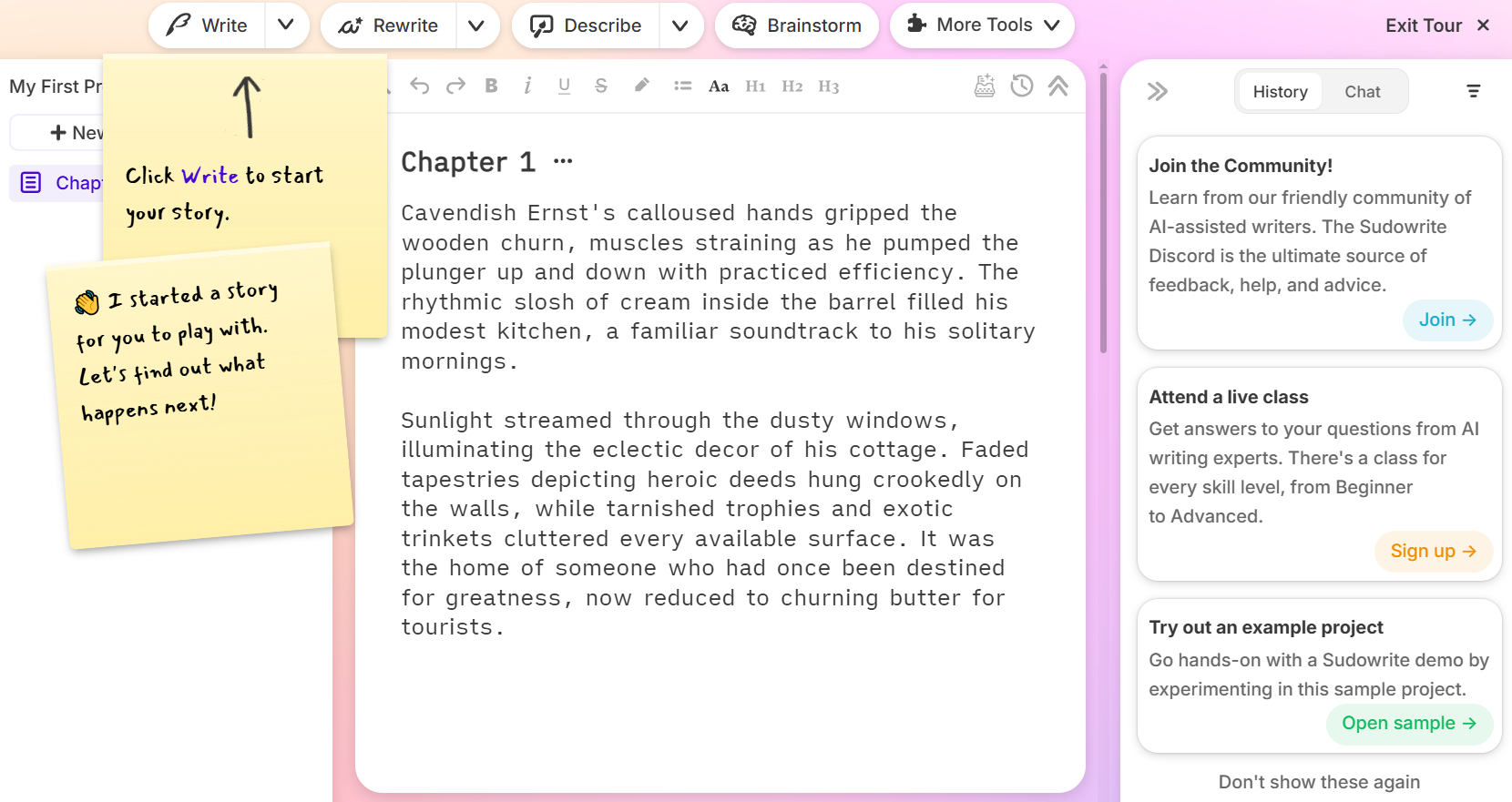
Sudowrite’s core value is acceleration and ideation, not replacement. It offers a ‘Story Engine’ to help users generate plot outlines and key story beats, giving you a structural scaffold when you’re starting from scratch or stuck mid-manuscript. The ‘Rewrite’ function allows authors to rephrase sentences or paragraphs in various styles and tones—useful when a scene feels flat but you can’t pinpoint why. The ‘Guides’ feature provides AI-generated suggestions for expanding on a sentence, paragraph, or even an entire chapter, which works well for fleshing out sparse drafts.

Users can provide descriptive inputs to guide the AI in generating more specific and detailed prose, which means the quality of output depends heavily on how well you prompt it. The ‘Shrink’ tool can summarize large blocks of text, aiding in content review when you need to condense backstory or trim exposition. Sudowrite includes a ‘Visualize’ feature that creates image prompts based on written descriptions, useful for world-building and maintaining visual consistency across scenes.

⛔ Dealbreaker: Skip this if you need direct integrations with popular desktop writing software like Scrivener or Ulysses—you’ll be copy-pasting between apps, which disrupts flow and adds friction to your workflow.

Who Should Seriously Consider Sudowrite

Sudowrite is primarily designed for fiction writers, including novelists and short story authors who work across genres—romance, sci-fi, fantasy, thriller, literary fiction. Professional authors can use it to accelerate drafting or refine specific sections of their work, particularly when facing tight deadlines or when a chapter refuses to cooperate. Aspiring writers and those taking storytelling courses can leverage the tool for practice and idea generation, treating it as a low-stakes sandbox for experimenting with narrative techniques.

It can be used as a creative partner to explore alternative dialogue options and scene constructions, which is valuable when you’re workshopping a manuscript or testing reader reactions to different story choices. The tool works best for writers who already understand story structure and can evaluate whether AI suggestions strengthen or weaken their narrative—it’s not a substitute for craft knowledge.

Who Should NOT Use Sudowrite

Writers expecting a fully autonomous story generator will be disappointed. AI-generated content often requires significant human editing to ensure originality and maintain a consistent voice, so if you’re unwilling to spend time revising and rewriting AI output, this tool will frustrate you. Authors unwilling to heavily edit AI output should skip Sudowrite entirely—the platform accelerates drafting but doesn’t eliminate the need for editorial judgment.

Users primarily focused on non-fiction or academic writing won’t benefit from Sudowrite’s fiction-specific features like character development tools and narrative arc suggestions. The AI may occasionally produce repetitive phrases or generic descriptions if not guided precisely, which means you’ll waste session credits on unusable text if you don’t learn effective prompting techniques. Sudowrite is not a full-fledged manuscript editor and does not replace the need for professional human editing before publication.

⛔ Dealbreaker: Skip this if you’re looking for a tool that handles technical documentation, business writing, or academic essays—Sudowrite’s models are trained on fiction and perform poorly outside that domain.

Sudowrite vs. NovelAI: When Each Option Makes Sense

Sudowrite and NovelAI—a subscription-based AI storytelling platform popular with genre fiction writers—approach fiction writing from different angles. Sudowrite’s structured tools for plot and character development make it easier for authors who want guided assistance and clear feature sets (Story Engine, Rewrite, Guides). NovelAI’s emphasis on freeform generation and customizable models appeals to writers who prefer minimal structure and want more control over the AI’s behavior, including fine-tuning models for specific genres or writing styles.

Comparison Visual

💡 Rapid Verdict:
Best for fiction authors who need structured brainstorming and plot scaffolding tools, but SKIP THIS if you require deep model customization or prefer a completely freeform writing environment without predefined feature buttons.

Bottom line: choosing based on workflow preference and desired level of AI guidance means Sudowrite fits authors who want a “creative assistant” with clear functions, while NovelAI suits writers comfortable with prompt engineering and who want the AI to follow their lead without guardrails.

Pricing also differs significantly. NovelAI starts at $10/mo with a free plan available, making it accessible for budget-conscious writers or those testing AI fiction tools for the first time. Sudowrite starts at $19/mo with no free plan, which means you’re committing upfront without a trial period to evaluate fit. If cost is a primary constraint, NovelAI’s lower entry point and free tier make it easier to experiment, but you’ll sacrifice Sudowrite’s polished interface and structured feature set.

⛔ Dealbreaker: Skip Sudowrite if you need a free trial or freemium tier to test the tool before paying—there’s no way to evaluate whether the platform suits your writing style without subscribing first.

Key Risks or Limitations of AI in Fiction Writing

Maintaining a unique authorial voice is the biggest challenge when using AI writing tools. The AI generates prose based on patterns in its training data, which means output can feel generic or derivative if you don’t actively guide it toward your specific style and tone. Ensuring narrative consistency and originality requires constant vigilance—the AI doesn’t track character motivations, plot threads, or thematic arcs across chapters, so you’ll catch continuity errors and repetitive phrasing during editing.

The necessity of human oversight and editorial refinement can’t be overstated. While powerful, the AI struggles with truly original plot twists or deep character psychological insight without significant user input, which means you’re still doing the creative heavy lifting. What stood out was how much time you spend evaluating AI suggestions rather than writing—you’re trading drafting speed for editorial decision-making, and that trade-off isn’t always favorable depending on your workflow.

  • AI-generated content often requires significant human editing to ensure originality and maintain a consistent voice
  • The AI may occasionally produce repetitive phrases or generic descriptions if not guided precisely
  • While powerful, the AI struggles with truly original plot twists or deep character psychological insight without significant user input
  • Sudowrite is not a full-fledged manuscript editor and does not replace the need for professional human editing

How I’d Use It

How to Use Visual

Scenario: a solo fiction author seeking to enhance their creative workflow and overcome writer’s block
This is how I’d think about using it under real operational constraints.

  1. Start with the Story Engine for outlining: Before drafting, I’d use the Story Engine to generate a rough plot outline and key story beats. This gives me a structural roadmap and helps identify weak points in the narrative arc before I’ve written thousands of words.
  2. Draft scenes manually, then use Guides for expansion: I’d write the core dialogue and action beats myself to maintain voice consistency, then use the Guides feature to expand sparse descriptions or add sensory detail. This keeps my authorial fingerprint on the prose while offloading the tedious work of fleshing out settings.
  3. Use Rewrite for dialogue polish: When a conversation feels stilted, I’d run it through Rewrite with different tone prompts (casual, tense, formal) to see alternative phrasings. I’d cherry-pick the best lines rather than accepting full rewrites, which helps avoid the AI flattening character voices.
  4. Brainstorm with Visualize for world-building: For fantasy or sci-fi projects, I’d use Visualize to generate image prompts for locations and characters. This helps maintain visual consistency and gives me reference material when describing settings across multiple chapters.
  5. Shrink for revision passes: During editing, I’d use Shrink to summarize chapters and identify pacing issues or redundant subplots. This is faster than re-reading the entire manuscript and helps spot structural problems that are hard to see when you’re deep in the prose.
  6. Expect friction with copy-pasting: Since Sudowrite doesn’t integrate with Scrivener (my primary writing app), I’d lose time copying text back and forth. This workflow interruption would slow me down during high-focus drafting sessions, and I’d need to decide whether the AI’s value outweighs that friction.

My Takeaway: Sudowrite works best as a brainstorming and expansion tool, not a primary drafting environment. I’d use it for specific tasks (outlining, description enhancement, dialogue alternatives) rather than trying to write entire chapters inside the platform, which keeps my workflow efficient and minimizes the copy-paste tax.

Workflow Visual

Pricing Plans

Below is the current pricing overview:

Product Starting Price (Monthly) Free Plan
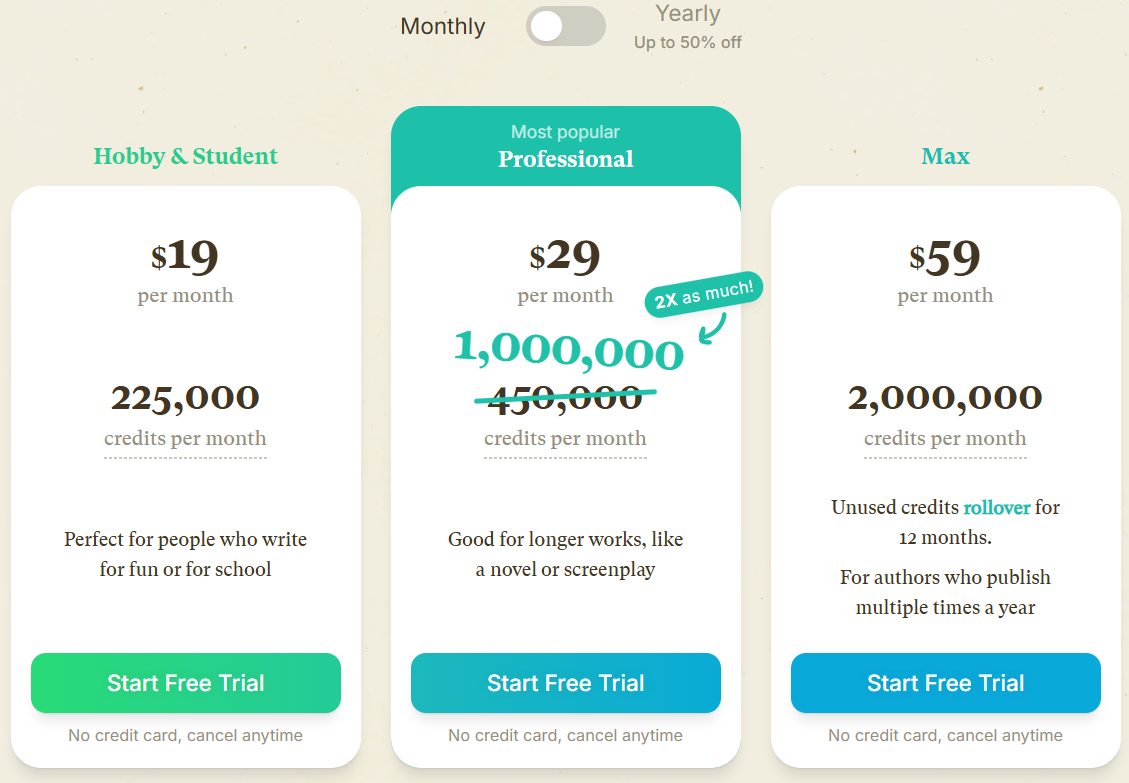
Sudowrite $19/mo, $29/mo, $59/mo No
NovelAI $10/mo Yes
Jasper $69/mo No
ChatGPT Free ($0/mo), Go ($8/mo), Plus ($20/mo), Pro ($200/mo) Yes
AI Dungeon $9.99/mo, $14.99/mo, $29.99/mo, $49.99/mo Yes

Pricing information is accurate as of January 2026 and subject to change.

Sudowrite’s $19/mo entry point sits between NovelAI’s budget-friendly $10/mo and Jasper’s premium $69/mo, but the lack of a free plan means you can’t test the platform before committing. If you’re experimenting with AI fiction tools for the first time, ChatGPT’s free tier or NovelAI’s free plan offer lower-risk entry points, though you’ll sacrifice Sudowrite’s fiction-specific features. The $29/mo and $59/mo tiers increase word generation limits and unlock additional features, which matters if you’re drafting full-length novels rather than short stories or course materials.

Friction Notes

Heavy Editing Overhead and Limited Entry Testing

Instructors must budget time for teaching prompt quality and output evaluation, not just feature usage

  • No free tier or trial period blocks risk-free evaluation before committing to student licenses or course integration
  • AI output requires significant human editing for voice consistency and originality—students need training on evaluating suggestions, not just generating text
  • Tool struggles with deep character psychology and original plot development without precise user guidance, requiring instructor intervention during complex assignments
  • Platform performs poorly outside fiction domain, limiting utility for mixed-genre courses covering non-fiction or technical writing

🚨 The Panic Test

You’re three weeks from a manuscript deadline. Writer’s block hit hard. You need 10,000 usable words by Friday.

Forget trying to write the entire draft in Sudowrite. Just use the Story Engine to outline the remaining chapters, then draft the dialogue and key action beats yourself. Run your sparse scenes through Guides to add description and sensory detail. Use Rewrite on any dialogue that feels wooden. Don’t accept AI output verbatim—cherry-pick the best phrases and rewrite the rest in your voice.

One thing that became clear: the AI won’t save you if you don’t already know where your story is going. It accelerates execution, not ideation. If you’re stuck on plot or character motivation, you’ll spend more time rejecting bad AI suggestions than you would brainstorming manually. Use it for expansion and polish, not for solving fundamental story problems.

Don’t overthink the tier. Start with $19/mo. If you hit word limits, upgrade. If the tool doesn’t fit your workflow after a month, cancel and try NovelAI’s free plan instead.

Next Steps

Test Fit Before Course-Wide Rollout

Validate editing burden and workflow friction with a single instructor account handling typical student drafting scenarios

  • Run one complete assignment cycle using Story Engine for outlining and Guides for expansion—measure time spent editing AI output versus time saved on initial drafting
  • Test copy-paste workflow between Sudowrite and your standard course submission platform or writing software to quantify friction during multi-hour writing sessions
  • Compare student learning outcomes when using Sudowrite for brainstorming versus manual outlining methods—verify the tool accelerates skill development rather than substituting for craft knowledge

Do this next:

  1. Purchase single $19/mo license and complete three typical course assignments using Story Engine, Guides, and Rewrite features to assess output quality
  2. Document editing time required per 1,000 AI-generated words to establish realistic workflow expectations for student assignments
  3. Test Visualize feature with genre-specific world-building exercises to confirm image prompts provide usable reference material for consistency
  4. Compare total time investment (prompting + editing) against traditional manual drafting for equivalent assignment scope before scaling to class licenses

Final Decision Guidance: Is Sudowrite the Right Choice for Your Story?

Assessing your specific writing needs and goals means asking whether you need structured creative assistance or freeform generation. If you want clear feature buttons for plot outlining, character brainstorming, and prose expansion, Sudowrite’s interface makes those tasks straightforward. If you prefer a blank canvas where the AI follows your lead without predefined tools, NovelAI or ChatGPT might suit you better.

Weighing the benefits against the learning curve and limitations requires honesty about how much editing you’re willing to do. Sudowrite accelerates drafting, but you’ll spend significant time refining AI output to match your voice and ensure narrative consistency. The lack of integrations with desktop writing software means workflow friction—every time you copy-paste between apps, you lose focus and momentum. That friction compounds over weeks and months, so factor it into your decision.

Strategic integration of AI into your creative process means treating Sudowrite as a brainstorming partner, not a co-author. Use it for specific tasks where speed matters (outlining, expanding sparse scenes, testing dialogue alternatives), but keep the core creative decisions—character arcs, thematic depth, plot twists—in your hands. The tool works best when you already understand story structure and can evaluate whether AI suggestions strengthen or weaken your manuscript. If you’re still learning the craft, invest in writing courses or critique groups before adding AI to your workflow—the tool amplifies your existing skills but doesn’t teach you how to write.

Closing Visual

Leave a Reply

Your email address will not be published. Required fields are marked *